请注意,本文编写于 246 天前,最后修改于 246 天前,其中某些信息可能已经过时。
如何在网页中显示组件源代码
有时候我们需要在网页中显示组件源代码方便别人查看,例如在组件库文档或者一些案例文档。那么在vite+react的开发环境中如何实现呢
HOC 对目标组件封装,添加显示源码的按钮
tsximport { SourceCodeViewer } from "./code";
const SourceCode = (WrappedComponent: React.FC, code: string) => {
  return function WithSourceCode(props:any) {
    return (
      <>
        <WrappedComponent {...props}></WrappedComponent>
        <SourceCodeViewer code={code}></SourceCodeViewer>
      </>
    );
  }
};

export default SourceCode
tsximport { Button } from 'antd'
import hljs from 'highlight.js';
import 'highlight.js/styles/github-dark.min.css'; // 你可以选择其他样式
import { useEffect, useState } from 'react';
export const SourceCodeViewer = ({ code, language = "tsx" }: {code:string,language?:string}) => {
  const [highlightedCode, setHighlightedCode] = useState("");

  const [show, setShow] = useState(false);

  useEffect(() => {
    const result = hljs.highlight(code, { language });
    setHighlightedCode(result.value);
  }, [code, language]);

  return (
    <div style={{borderLeft: '1px solid #ccc',borderRight:'1px solid #ccc',borderBottom:'1px solid #ccc',marginTop:'8px'}}>
      <div style={{padding: '4px 8px',borderTop:'1px dashed #ccc',borderBottom:'1px dashed #ccc'}}>
        <Button type="primary" onClick={() => { setShow(!show)}}>查看源码</Button>
      </div>

      {
        show ? (<pre style={{backgroundColor:'rgb(20,20,20)',color:'#8590a0',padding:'10px 10px 26px 10px'}}>
        <code dangerouslySetInnerHTML={{ __html: highlightedCode }} />
      </pre>) : null
      }

    </div>
  );
};
使用
import SourceCode from "@/components/source_code";
import Base01 from "./code";
import code from "./code.tsx?raw"; // 获取组件代码
export default SourceCode(Base01,code);
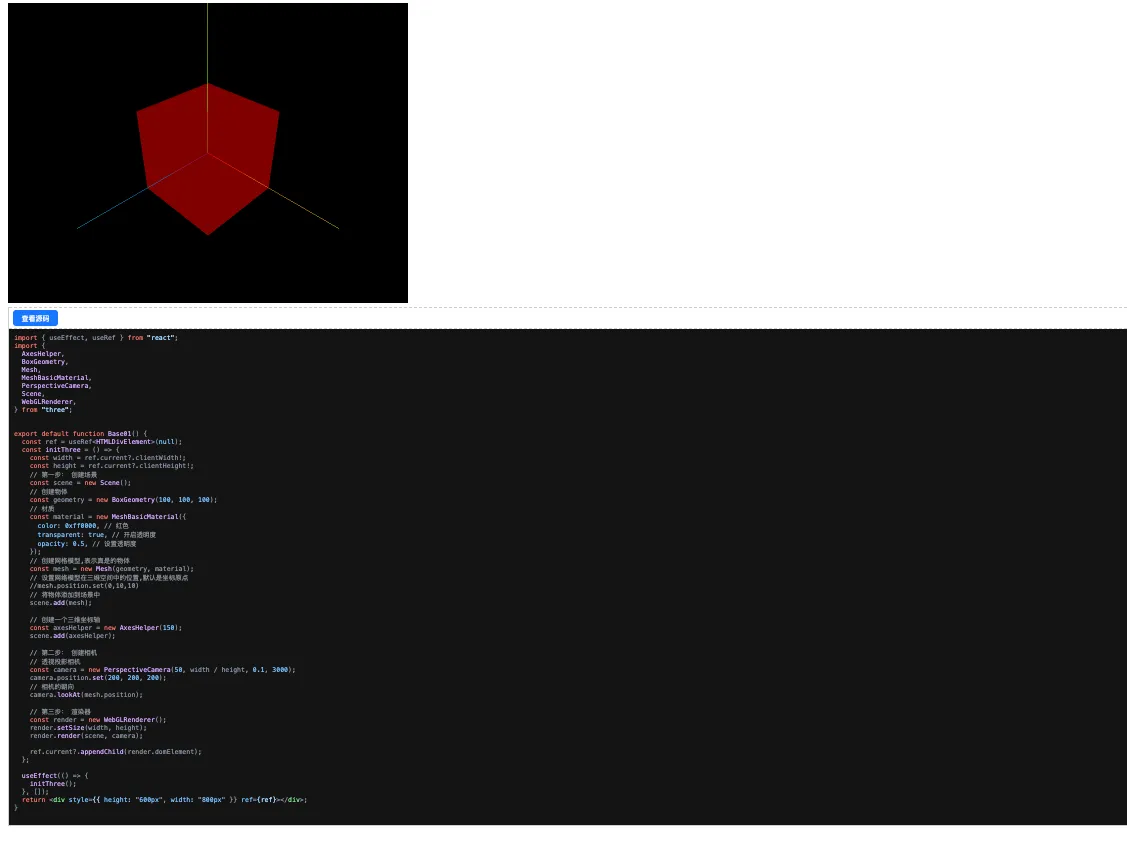
效果如图
如果对你有用的话,可以打赏哦
打赏


本文作者:繁星
本文链接:
版权声明:本博客所有文章除特别声明外,均采用 BY-NC-SA 许可协议。转载请注明出处!